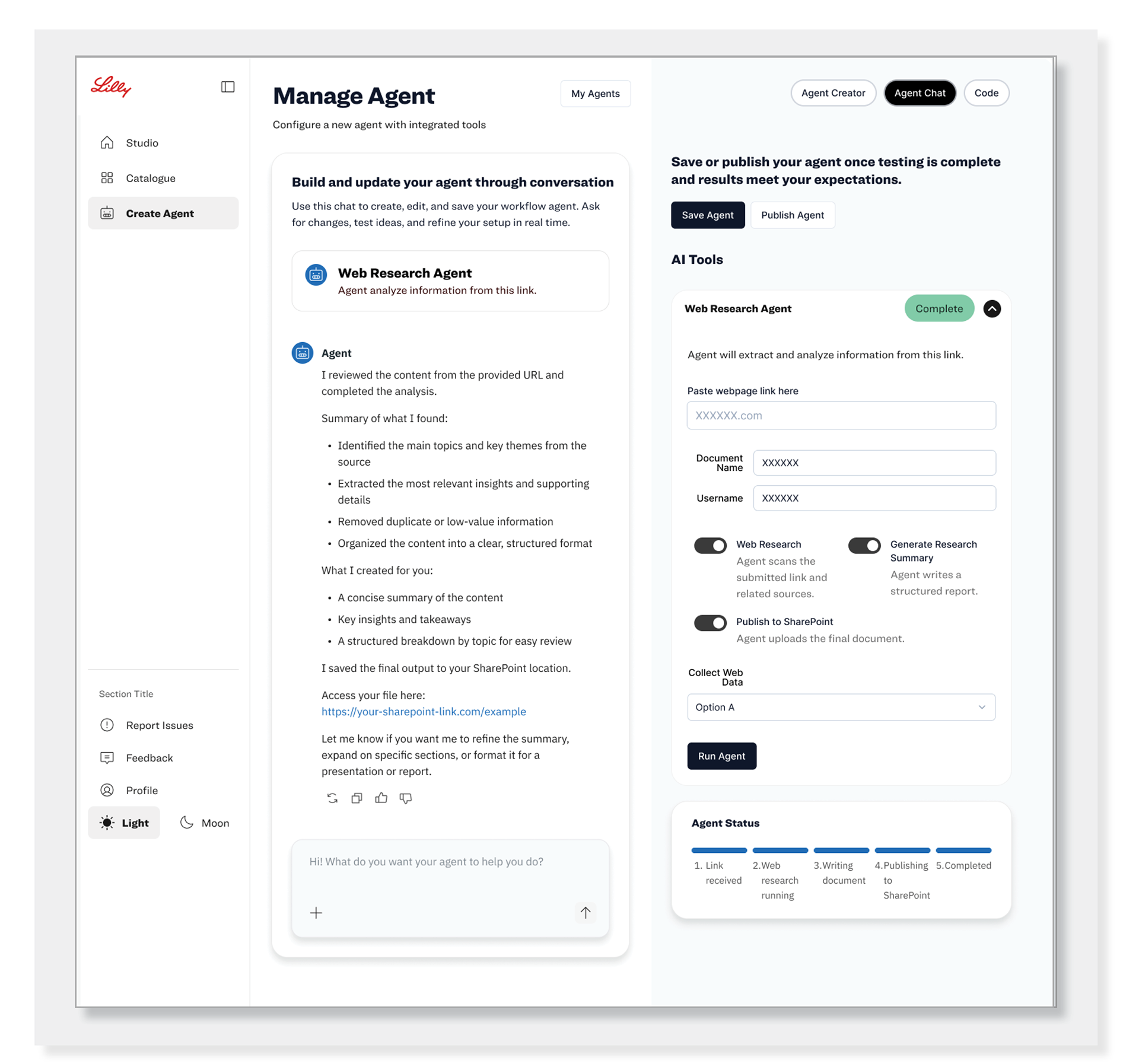
I helped design an enterprise AI platform that allowed employees to create and use AI agents without writing code. From research and workflow mapping to prototypes and final designs, I focused on creating a simple, intuitive experience that increased productivity by more than 50% across the organization.
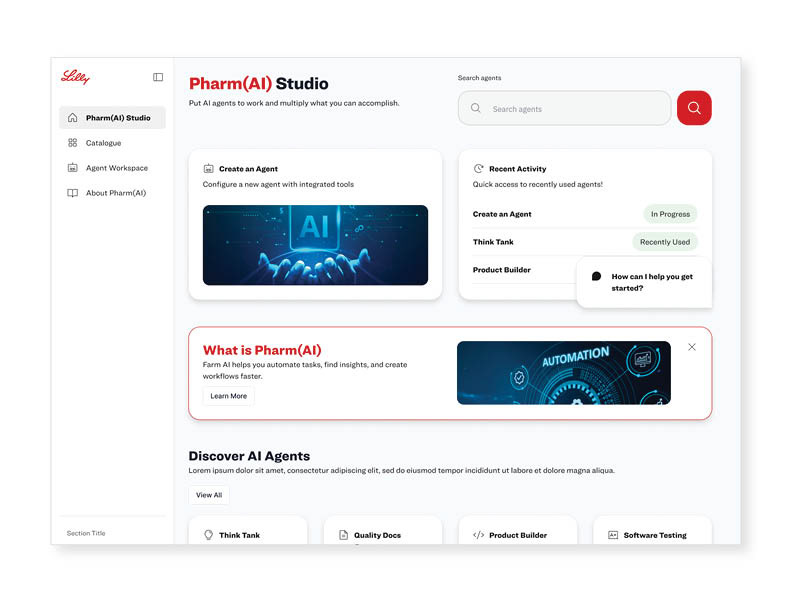
Goal - Make AI simple enough for anyone to use.
Design an enterprise platform that enabled employees to build and manage AI agents through a simple, guided experience. Every interaction focused on making AI approachable, efficient, and easy to adopt.
Timeline
Discover
Goal: Understand the problem.
What we did:
● Met with stakeholders.
● Learned about employee needs.
● Defined business goals.
● Identified pain points
Research & Plan
Goal: Find the best solution.
What we did:
● Mapped user journeys.
● Created user flows.
● Organized information.
● Prioritized key features.
Design
Goal: Bring ideas to life.
What we did:
● Sketched wireframes.
● Designed screens in Figma.
● Built interactive prototypes.
● Reviewed designs with the team.
Test & Improve
Goal: Make the experience better.
What we did:
● Conducted usability testing.
● Collected feedback.
● Fixed usability issues.
● Improved the design.
● Conducted usability testing.
● Collected feedback.
● Fixed usability issues.
● Improved the design.
Prepare for development.
What we did:
● Completed high-fidelity designs.
● Updated the design system.
● Created developer specifications.
● Reviewed accessibility.
Launch Support
Goal: Help deliver the product.
What we did:
● Supported Engineering.
● Reviewed builds.
● Answered design questions.
● Verified the final experience.
● Supported Engineering.
● Reviewed builds.
● Answered design questions.
● Verified the final experience.
My Role
UX Lead (Advocate for user needs while aligning solutions with business goals.)
My job is to make sure we're solving the right problem for the user. I lead workshops, talk with users, gather feedback, and turn ideas into simple designs. I work with Product, Engineering, and stakeholders to make sure what we design is useful, easy to build, and meets everyone's goals. I also keep the team updated so everyone stays aligned throughout the project.
The Team
Designers (UX/UI)Team
I partnered with the UX team to build consistent experiences that matched Lilly’s brand and design system.
Content Specialists
Reviewed messaging for readability and consistency.
Developers
Worked with UX to ensure designs were implemented correctly.
Product Managers (PMs)
Defined business goals and project priorities.
Stakeholders
Shared business requirements and project feedback.
Legal & Compliance
Ensured all experiences met legal and privacy requirements.
Lilly’s Brand Team
Ensured every experience followed brand guidelines.
My Tools
I used Figma to create user flows, wireframes, prototypes, and final designs while collaborating with the team throughout the project.

Discovery
● Met with stakeholders to understand business goals.
● Learned about employee needs and challenges.
● Identified key pain points.
● Used those insights to guide the UX direction.
● Focused on creating a simple, self-service AI experience.
Problem Statement
Employees wanted to use AI to work more efficiently, but creating AI solutions was too technical, time-consuming, and difficult for most people. We needed to design a simple, self-service experience that made AI easy to understand, easy to build, and easy to use.
UX Requirements
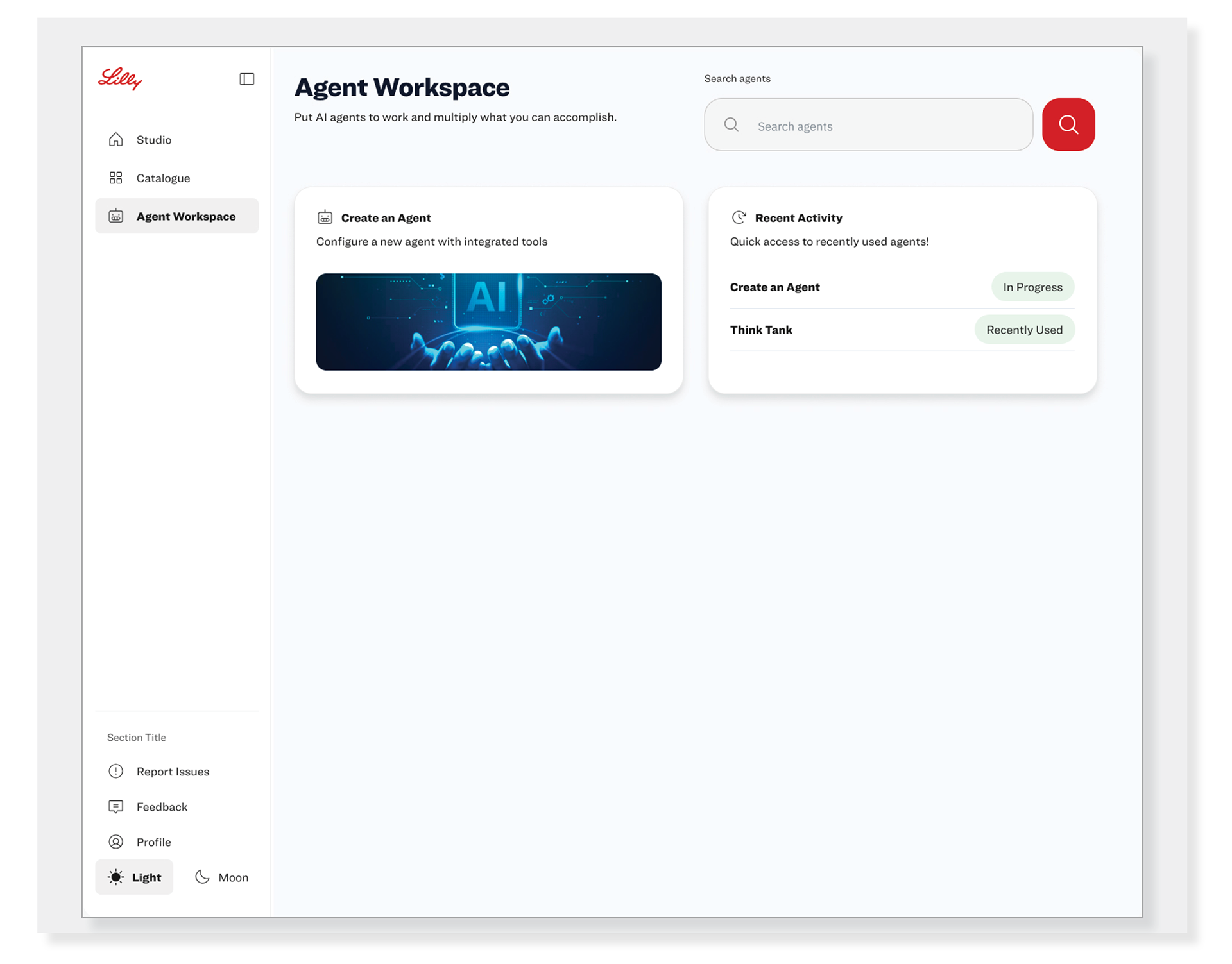
Navigation
● Give users a clear way to move between the Studio, Catalog, and Agent Workspace.
● Keep navigation consistent across the platform.
Search
● Place search at the top of the page for quick access.
● Allow users to find agents by name or keyword.
Create an Agent
● Make “Create an Agent” the primary action on the page.
● Clearly explain what happens when users select it..
Recent Activity
● Display recently used agents.
● Show the current status of each agent, such as “In Progress” or “Recently Used.”
● Allow users to quickly reopen their work.
Dashboard Layout
● Keep the page clean and easy to scan.
● Organize content into clear sections with enough spacing.
● Highlight the most important actions first.
User Experience
● Reduce the number of steps needed to create or find an AI agent.
● Help first-time users understand where to begin.
● Make common tasks easy to complete.
Accessibility
● Follow WCAG accessibility guidelines.
● Support keyboard navigation and screen readers.
● Maintain proper color contrast and readable text. their work.
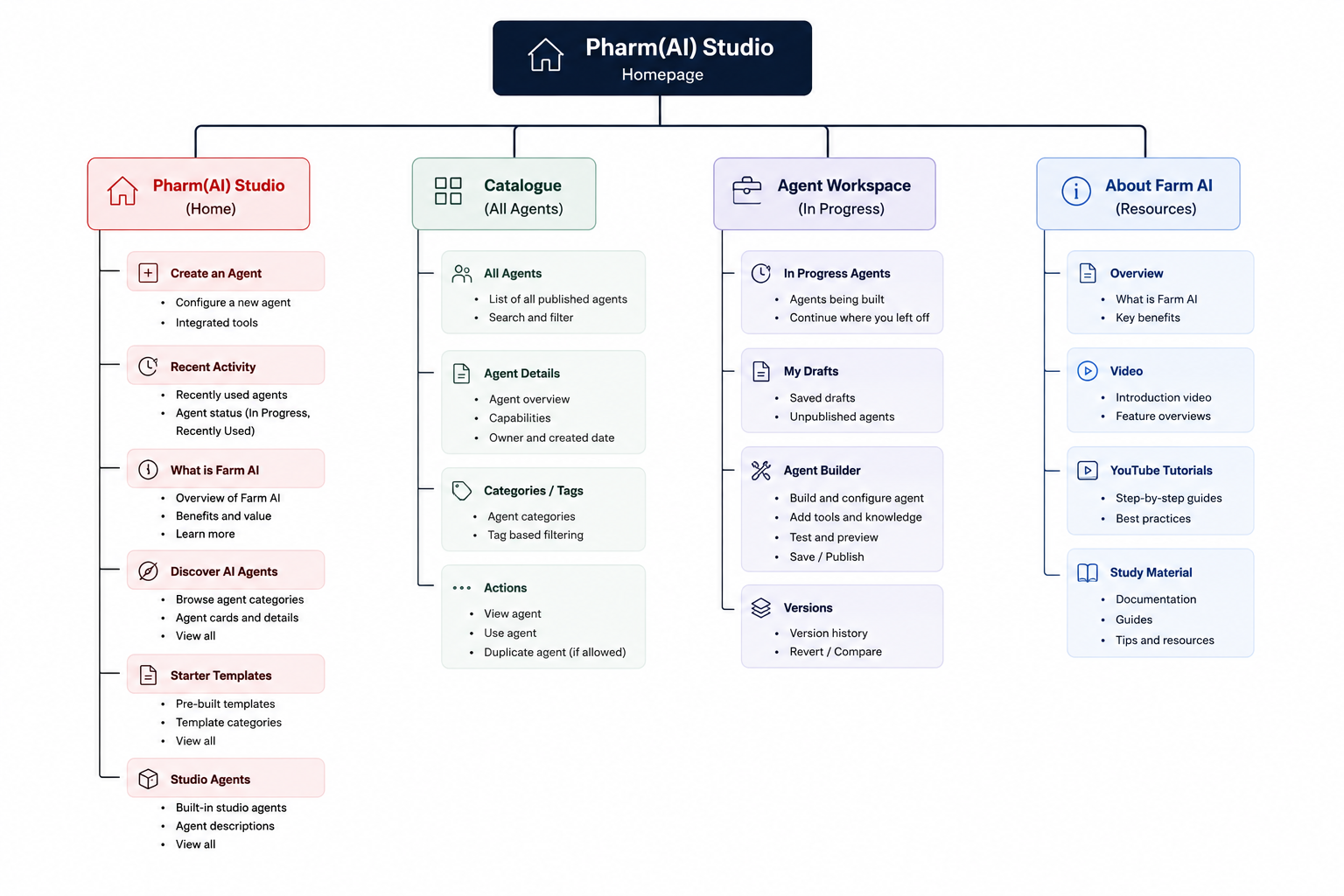
Why We Created the Navigation Tree
● Organize Information: Show what belongs on each page.
● Simplify Navigation: Show how users move through the platform.
● Align the Team: Give everyone a clear view of the structure.
● Guide the Design: Create a plan before designing the screens.
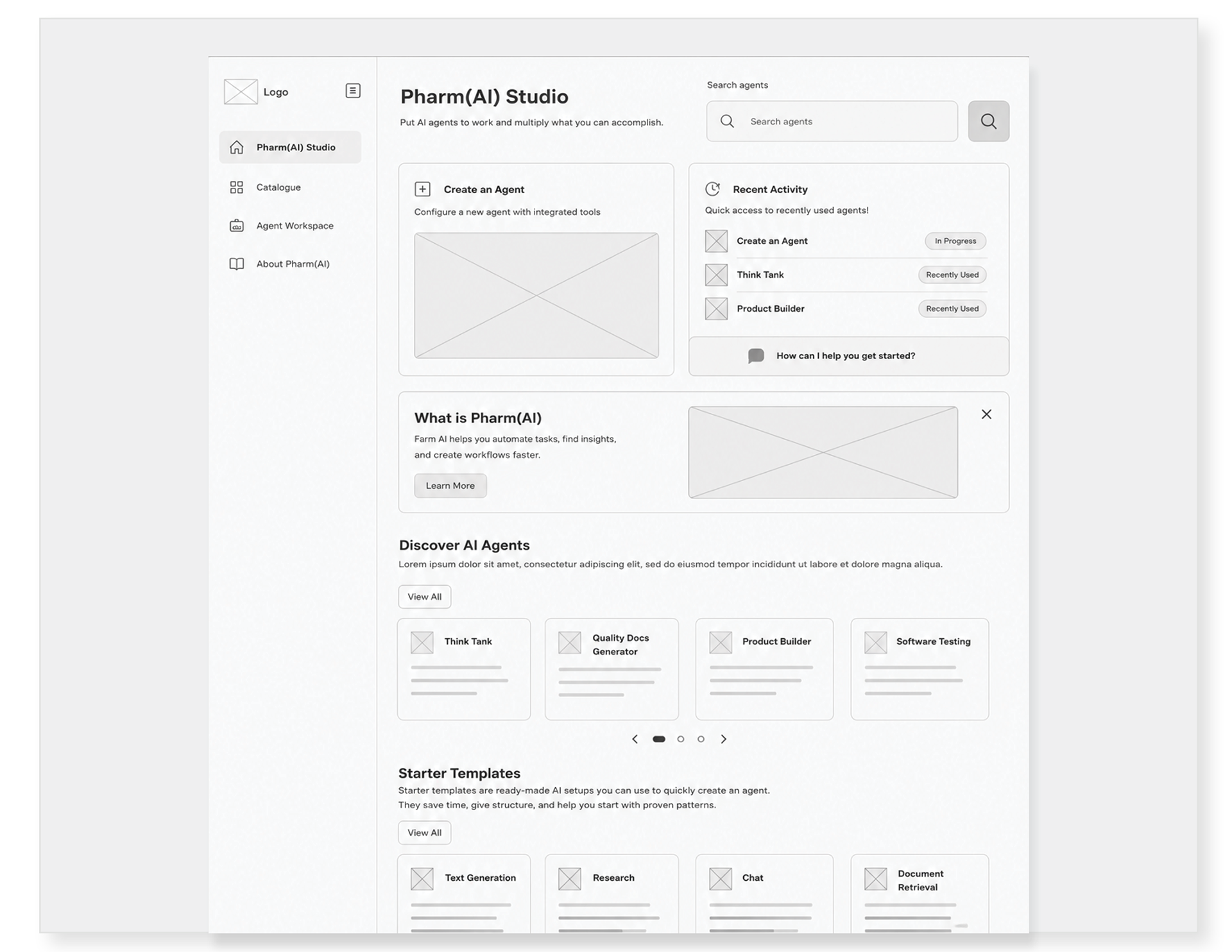
Why We Created This Wireframe
● Created a simple visual for the homepage.
● Helped define the layout and content.
● Showed how users would move through the page.
● Shared ideas with Product, UX, and stakeholders.
● Gathered feedback before moving into final designs.
From Discovery to Design
● Used research, user needs, and business goals to create the first Pharm(AI) design.
● Followed Lilly’s design system for a consistent experience.
● Included accessibility and usability from the start.
● Worked with content experts to keep messaging clear and on brand.
● Reviewed designs with Product, UX, and Engineering to improve the experience.
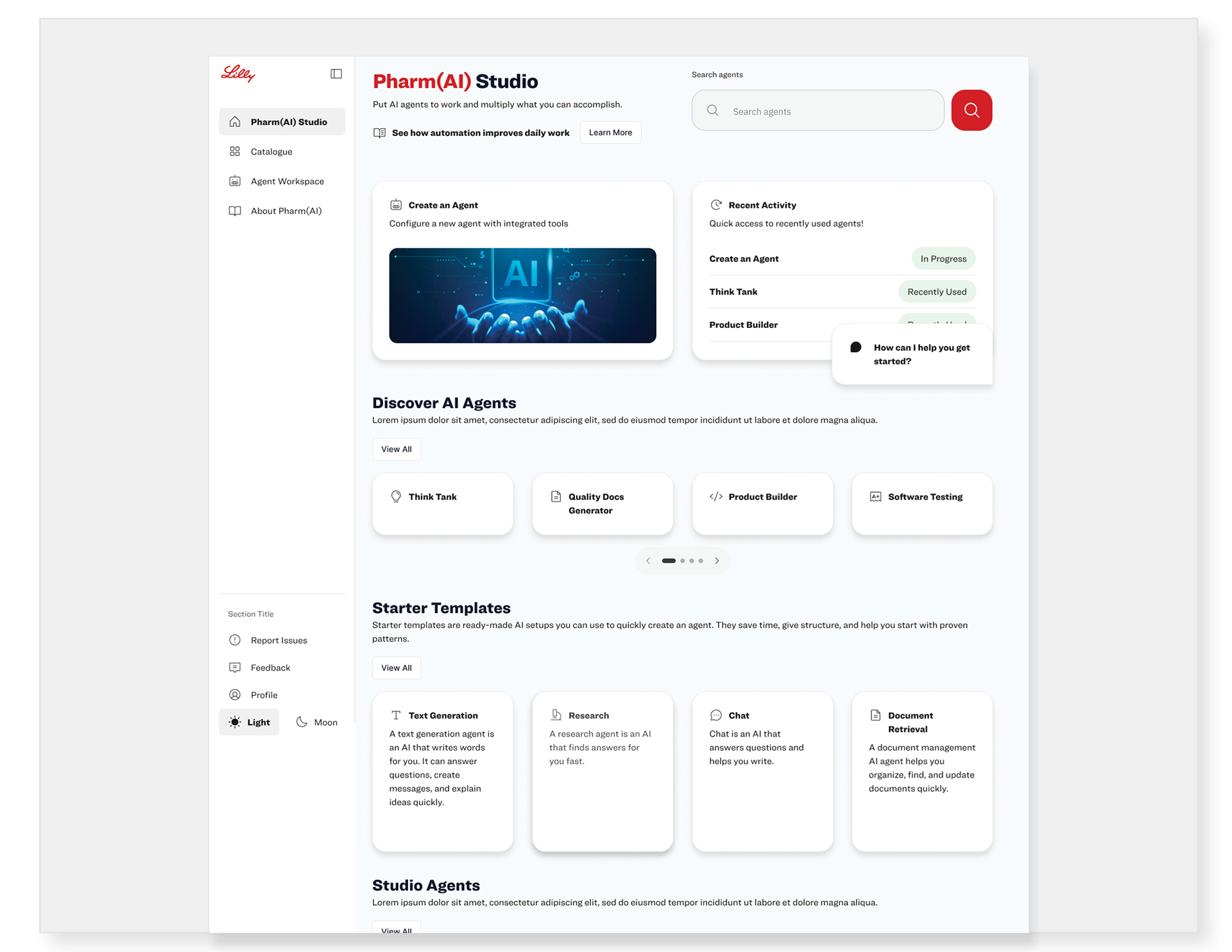
Design (A)
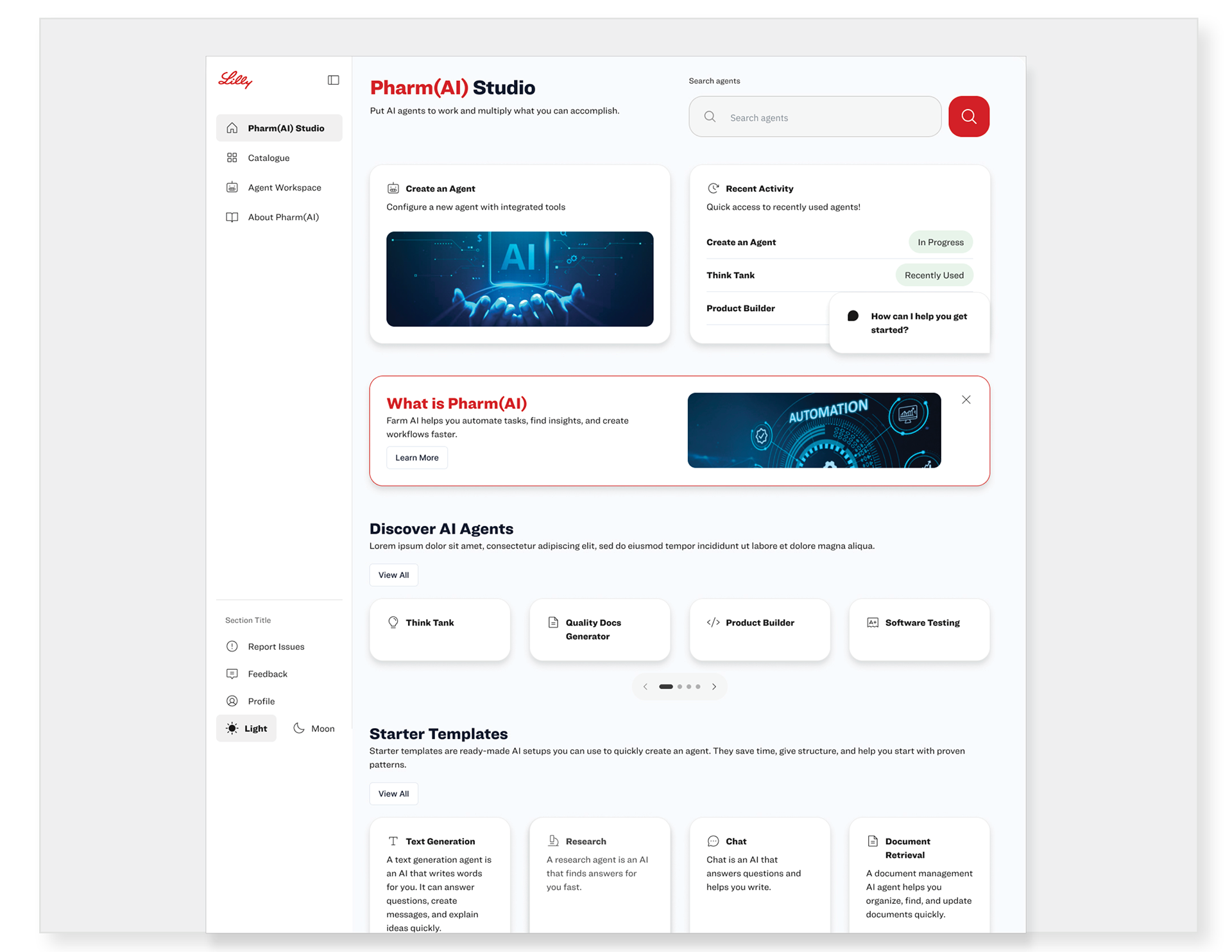
Design (B)
A/B Testing: What We Learned
We tested both homepage concepts with a small user group to understand which layout made Pharm(AI) easier to understand and use.
Version A
● Clean, simple layout
● Faster access to agents
● Experienced users preferred simplicity
● New users needed context
● Learn More easily missed
● Faster access to agents
● Experienced users preferred simplicity
● New users needed context
● Learn More easily missed
Version B
● Pharm(AI) section more visible
● Product purpose became clearer
● Improved new user onboarding
● Clearer path to learning
● Experienced users wanted space
● Product purpose became clearer
● Improved new user onboarding
● Clearer path to learning
● Experienced users wanted space
Design Validation
● Version B provided context
● Users understood Pharm(AI) better
● Core actions stayed visible
● Agent discovery remained accessible
● Version B moved forward
● Users understood Pharm(AI) better
● Core actions stayed visible
● Agent discovery remained accessible
● Version B moved forward
User Test Design Update Based on Feedback
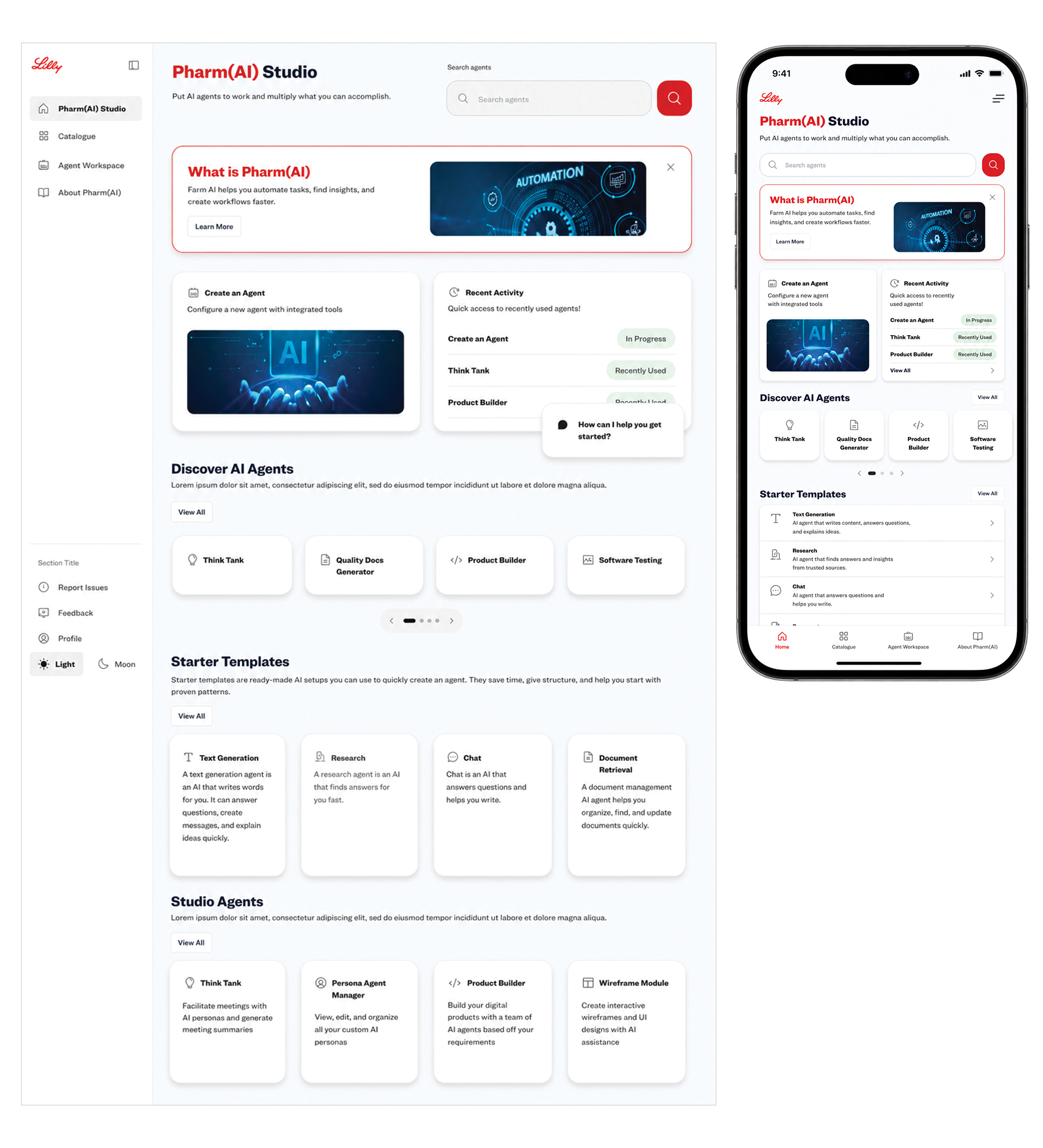
● Product stakeholders wanted more focus on explaining Pharm(AI) to new users.
● Added a new section that clearly explains what Pharm(AI) is and its benefits.
● Created a clear entry point to learn more about how Pharm(AI) works.
● Made learning about the product part of the main experience, helping new users get started with confidence.
Final Design: Bringing All Feedback Together
● Product feedback shaped priorities
● UX team improved consistency
● Stakeholders aligned business needs
● User testing validated decisions
● Development confirmed design feasibility
● Feedback guided final design
“Putting Education First: Helping users quickly understand what Pharm(AI) is and how it works.”
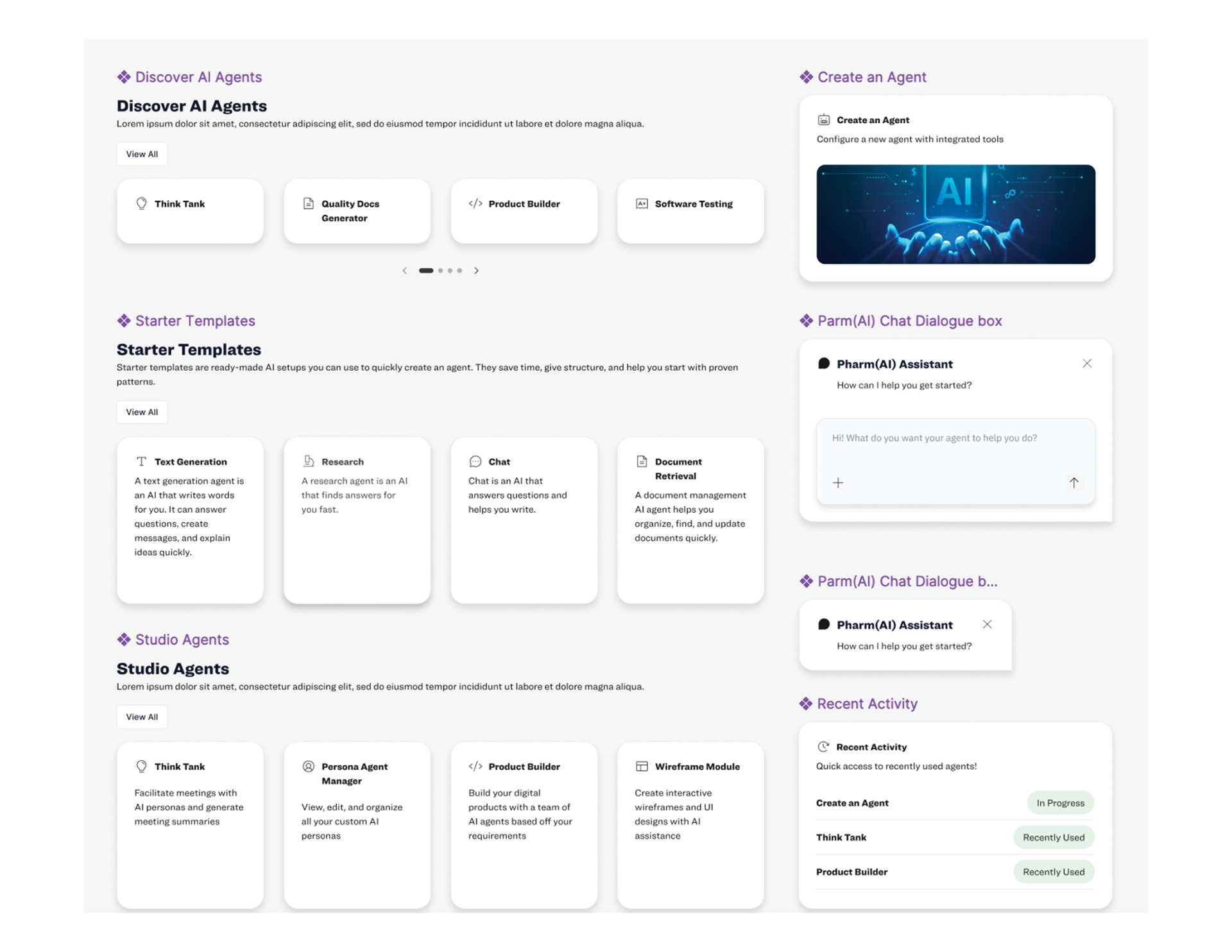
Preparing the Design for Development
● Built a custom DPL for Pharm(AI).
● Created reusable components for the new framework.
● Kept designs consistent with Lilly standards.
● Defined spacing, colors, typography, and interactions.
● Worked with developers to confirm feasibility.
● Prepared Figma designs for development handoff.
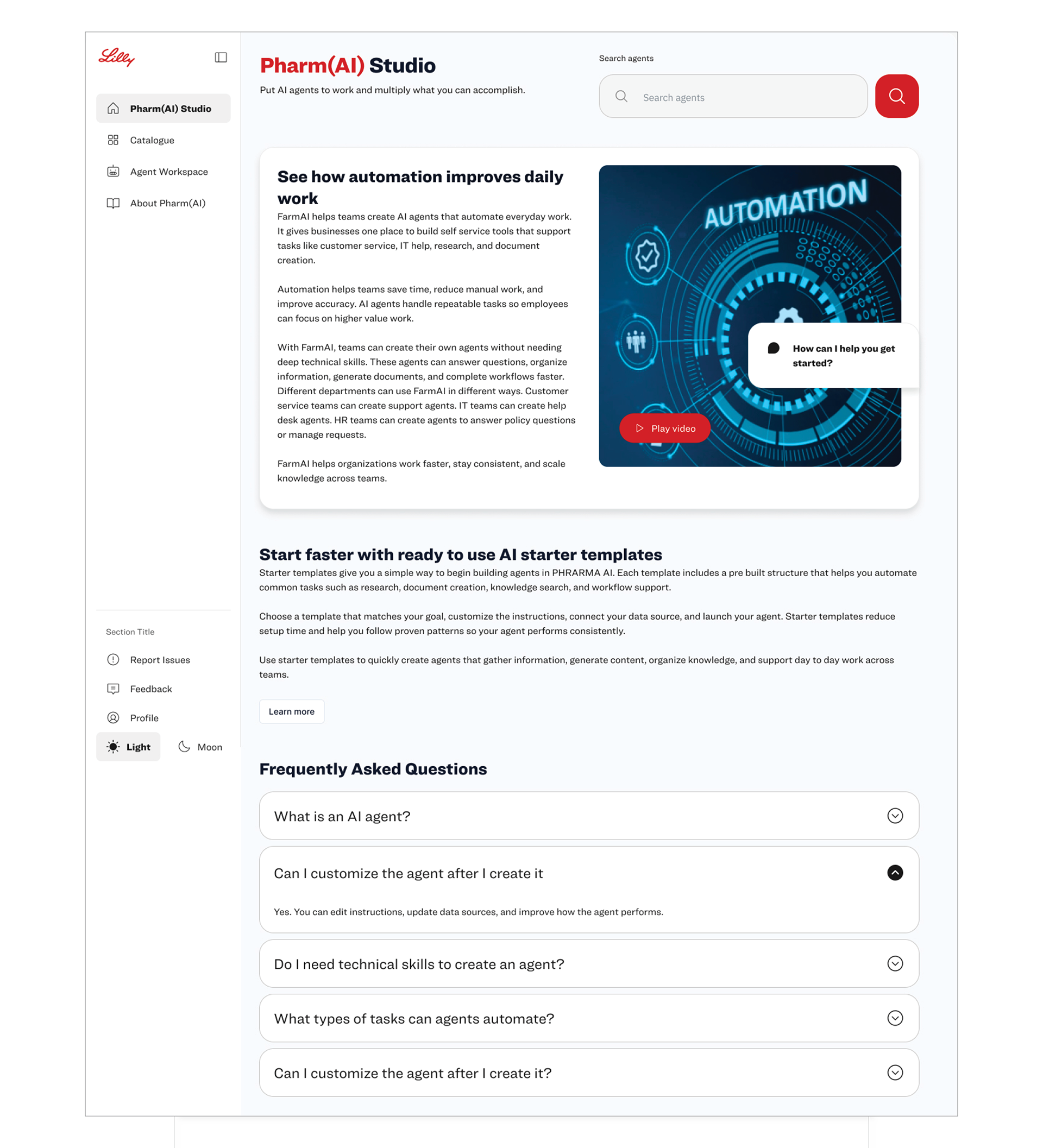
Pharm(AI) Detail & Learning Experience
This page gives users a deeper understanding of Pharm(AI), how it works, and how AI agents can support their work.
● Explains how Pharm(AI) works
● Shows key benefits and use cases
● Introduces AI starter templates
● Answers common user questions
● Shows key benefits and use cases
● Introduces AI starter templates
● Answers common user questions
● Connects directly from “Learn More” on the homepage
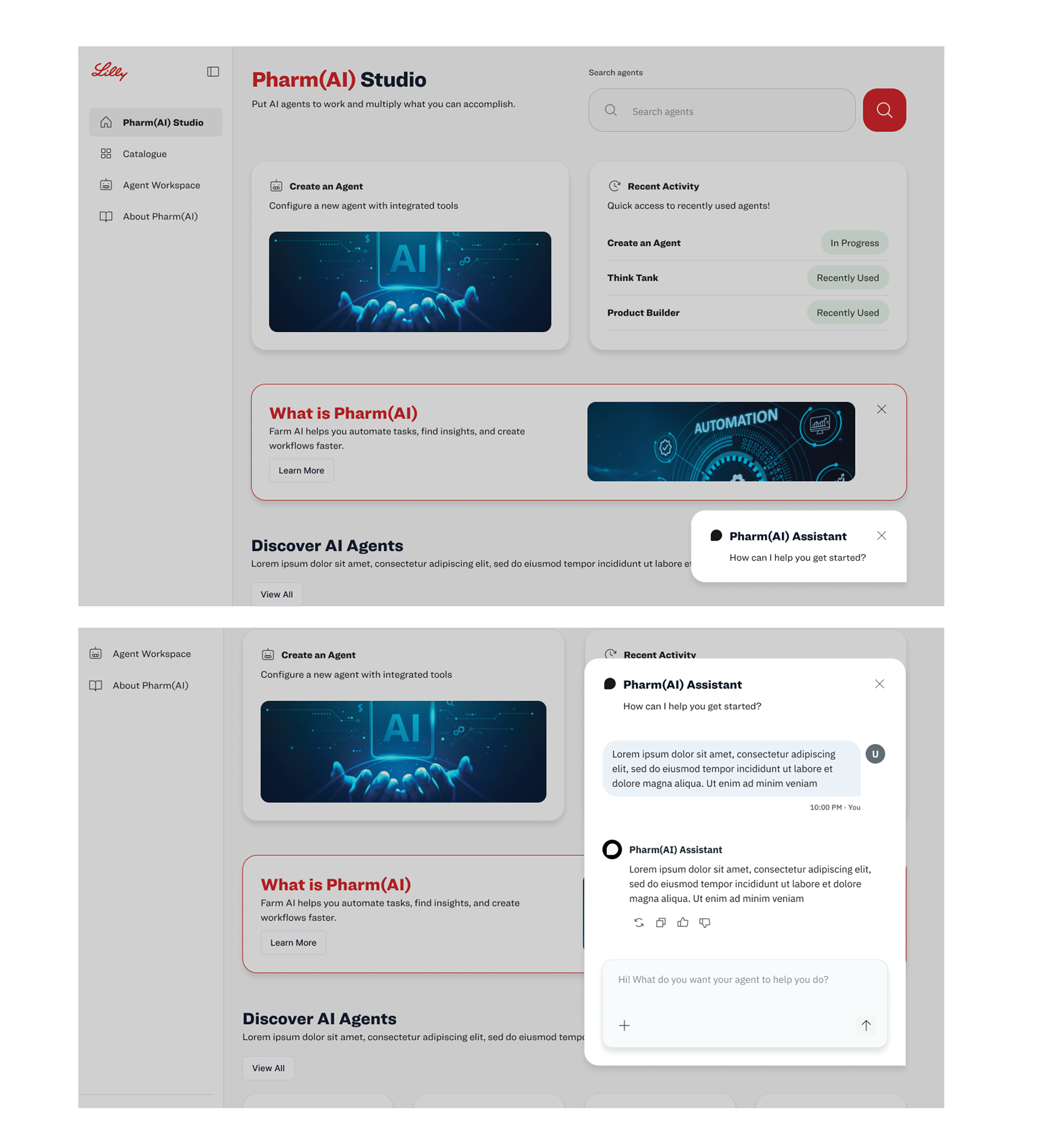
Lilly Pharm(AI) Chatbot: Helping Users Along the Way
● Answers questions about Pharm(AI)
● Helps users find features faster
● Supports learning and education
● Guides users through the experience
● Provides help when users need it
● Makes Pharm(AI easier to understand
Pharm(AI) Success: Making AI Easier to Use
● 50% increase in productivity
● 35% higher task completion
● 30% faster agent creation
● 35% higher task completion
● 30% faster agent creation
“Product managers shared key metrics that helped us measure Pharm(AI)’s success, identify opportunities, and improve the experience.”
Key Learnings
More Frequent User Testing & Validation
• I would involve users more frequently throughout the design process to continuously test and validate ideas.
• More frequent testing could have helped identify usability issues earlier and strengthen design decisions through direct user feedback.
• This project reinforced the importance of continuous validation, especially when designing AI experiences where user needs and behaviors continue to evolve.
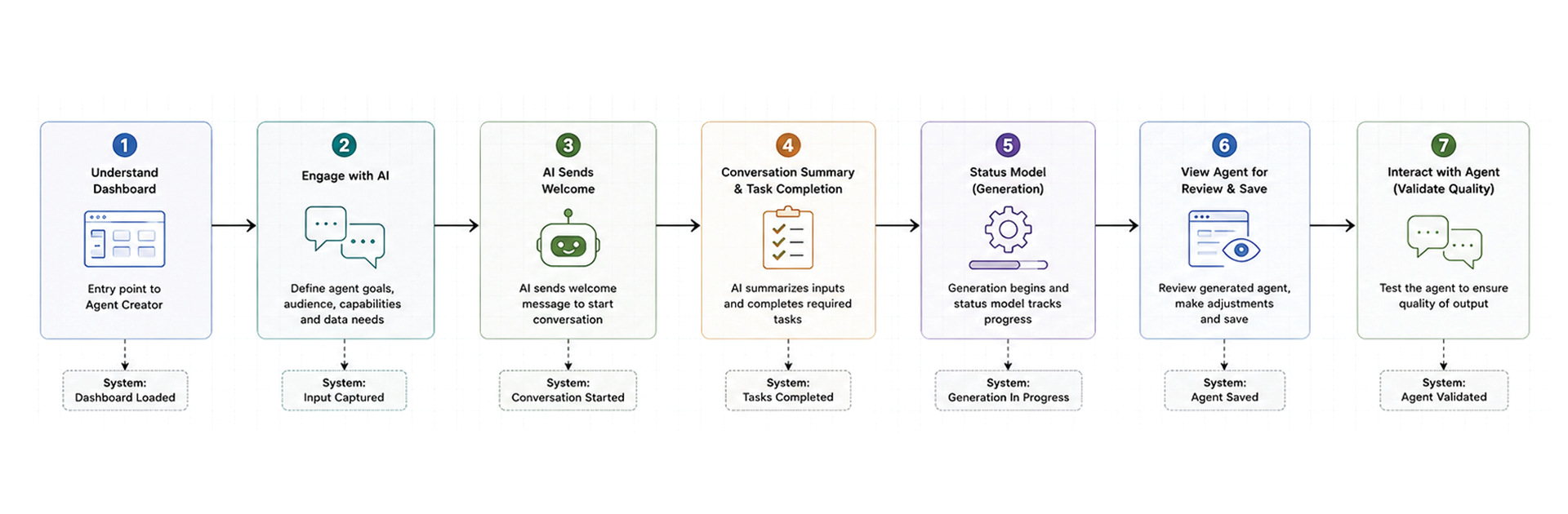
Creator Agent Flow
● Simplified AI agent creation through a guided, conversational experience.
● Helped users define their agent’s purpose, audience, capabilities, data sources, and tools.
● Provided real-time progress so users could quickly see what was complete and what information was still needed.
● Made AI agent creation easier for users with different levels of technical experience.
Baseline Conversational AI Flows
I created a set of core conversation flows to define how the AI communicates, responds to problems, and guides users through different situations.
• Latency Flow
Keeps users informed when the AI needs more time to process or generate a response.
Keeps users informed when the AI needs more time to process or generate a response.
• Error Handling
Helps users recover when the AI cannot understand or complete a request.
Helps users recover when the AI cannot understand or complete a request.
• Redirection Flow
Guides users to the correct task or experience when their request falls outside the current flow.
Guides users to the correct task or experience when their request falls outside the current flow.
• Human-in-the-Loop
Connects users with a person when the AI cannot confidently resolve the request.
Connects users with a person when the AI cannot confidently resolve the request.
• Clarification Flow
Asks follow-up questions when the AI needs more information.
Asks follow-up questions when the AI needs more information.
• Fallback Flow
Provides alternative options when the AI cannot determine what the user wants.
Provides alternative options when the AI cannot determine what the user wants.
• Input Validation
Checks that the user provided the correct or required information.
Checks that the user provided the correct or required information.
• Confirmation Flow
Asks users to confirm information before the AI takes an important action.
Asks users to confirm information before the AI takes an important action.
• Progress & Status
Communicates what the AI is doing during longer or multi-step tasks.
Communicates what the AI is doing during longer or multi-step tasks.
Step 1: Understanding the Dashboard
The dashboard serves as the starting point for the Agent Creator experience.
● Gives users a clear overview of the Pharm(AI) Studio experience.
● Provides an easy-to-find entry point to create a new AI agent.
● Helps users understand where to begin before entering the Agent Creator flow.
● Creates a simple transition from exploring the platform to building an agent.
Step 2: Engaging with the AI
● Users interact with the AI through a conversational experience to define the agent they want to create.
● The AI gathers the information needed to understand the agent’s purpose, audience, capabilities, data sources, and tools.
● A task tracker shows what information is complete and what is still needed before the agent can be generated.
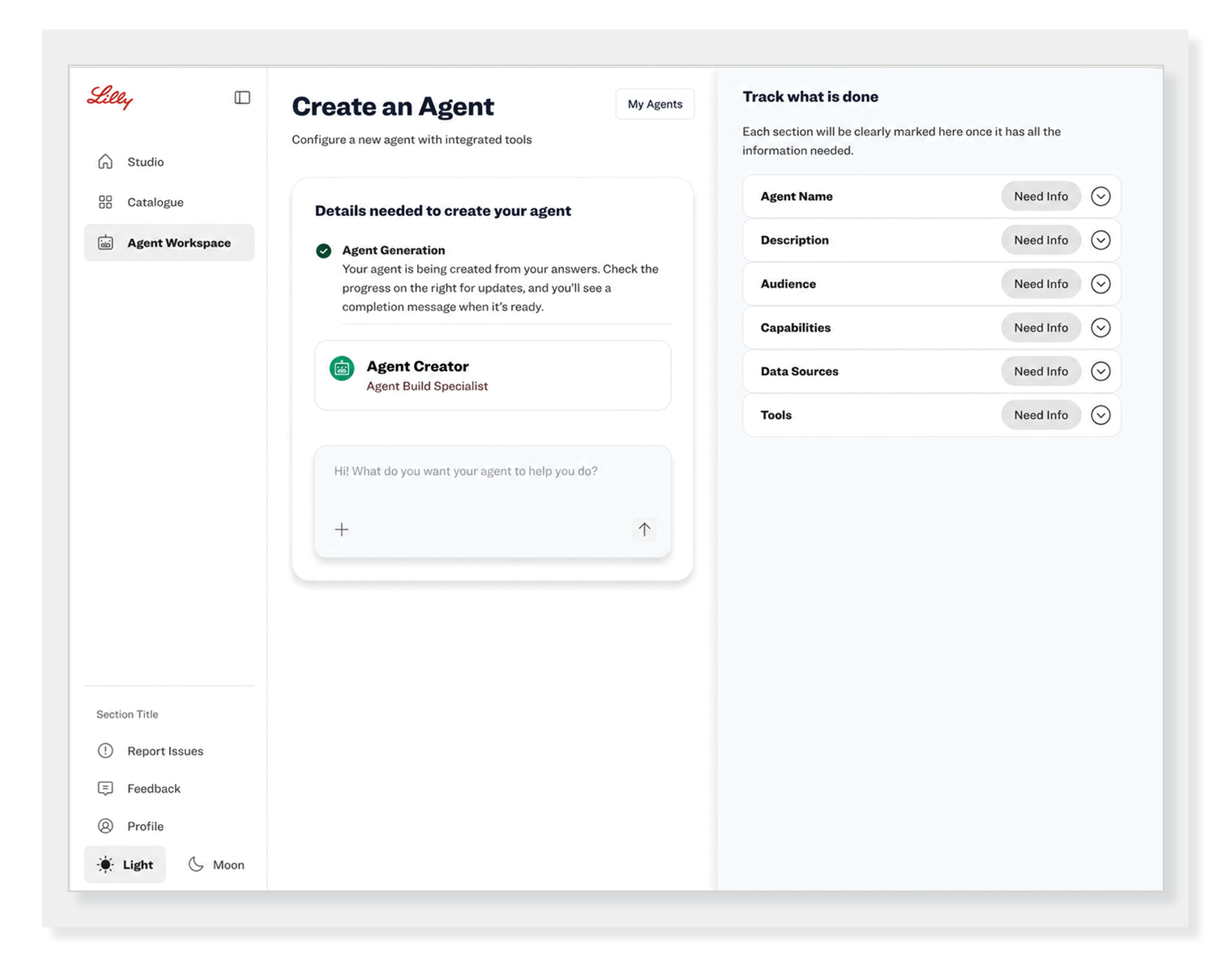
Step 3: Starting the AI Conversation
• The AI sends a welcome message to introduce the experience and begin the conversation.
• The message guides the user on what information to provide to start creating their agent.
• This creates a clear and simple starting point for the agent creation process.
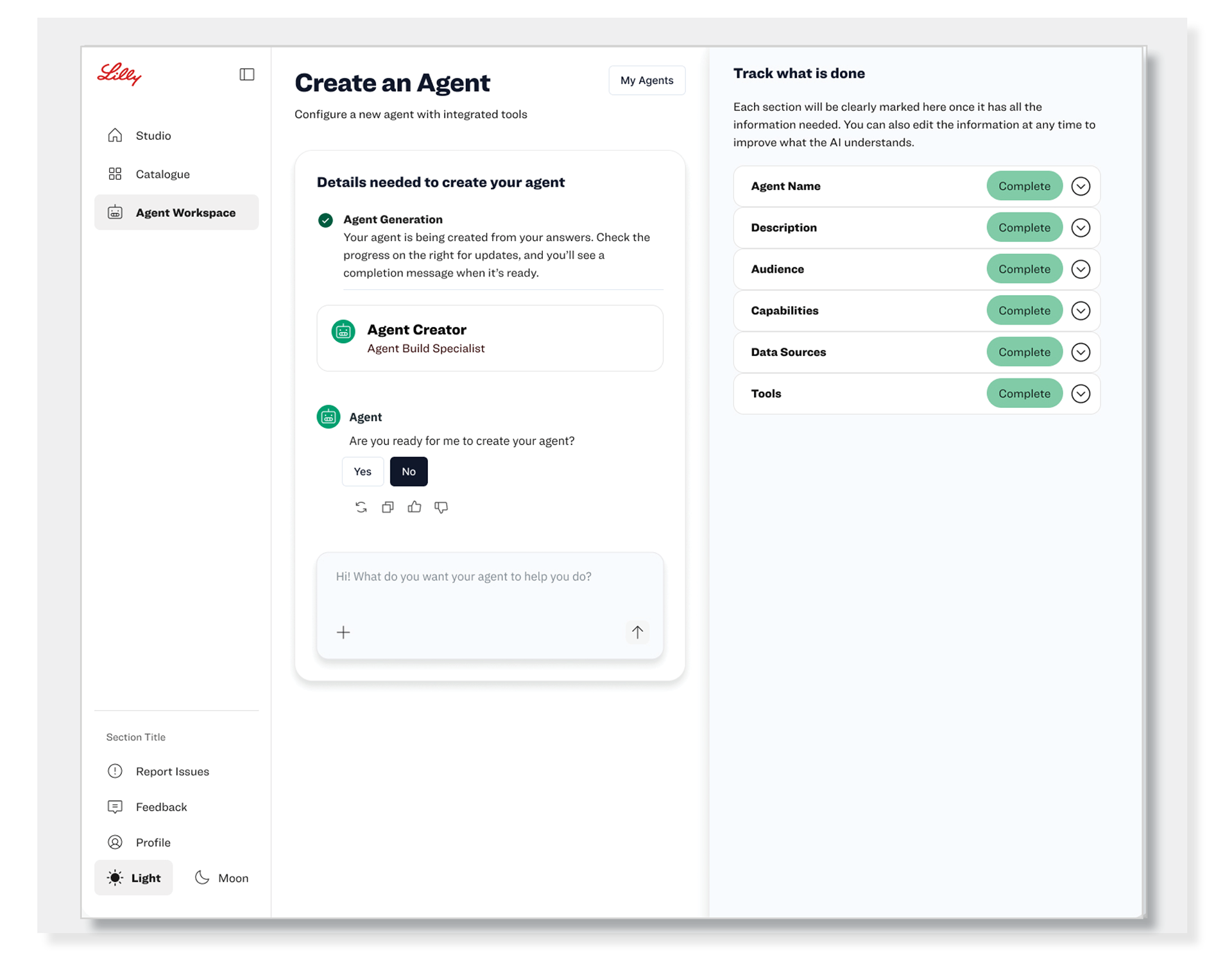
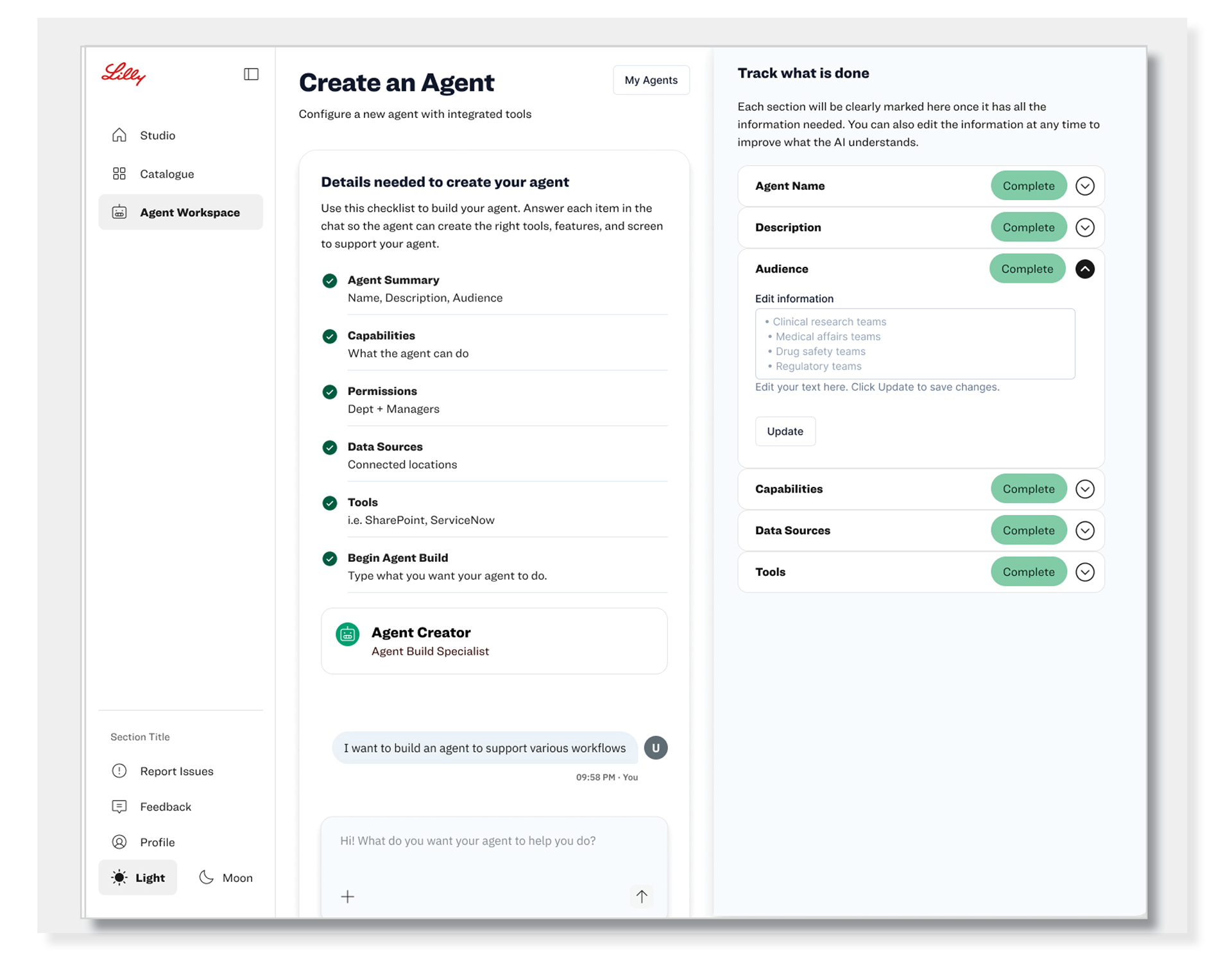
Step 4: Conversation Summary & Task Completion
• The AI summarizes the conversation and uses the information provided to complete the agent requirements.
• Users can track completed tasks and quickly identify any information still needed.
• Once all required information is complete, the agent is ready to be generated.
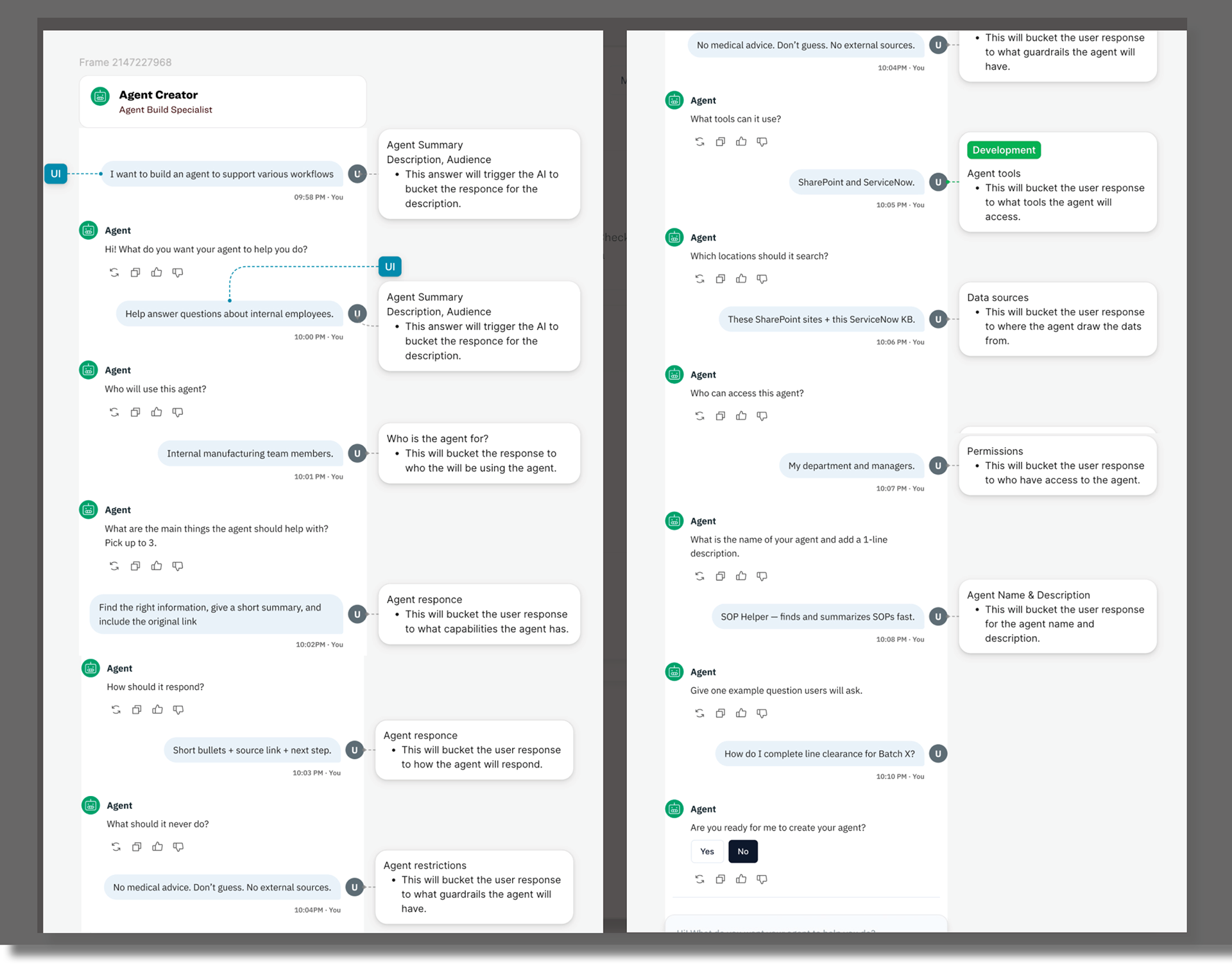
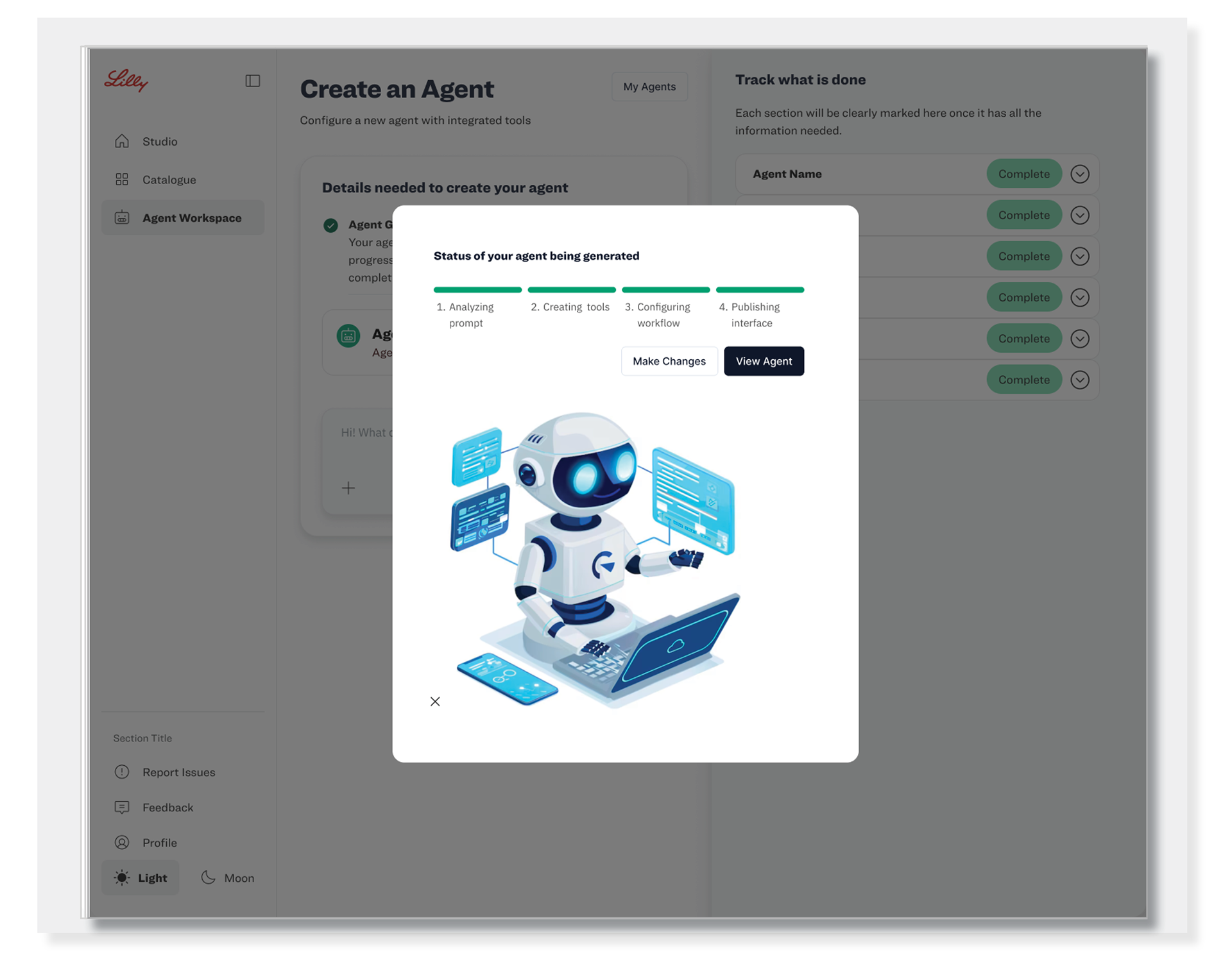
Step 5: Agent Generation Status
• The status model marks the start of the agent UI generation process.
• It shows users where the agent is in the build process and communicates progress as the experience is created.
• Clear status updates help users understand what is happening and when the agent is ready for review.
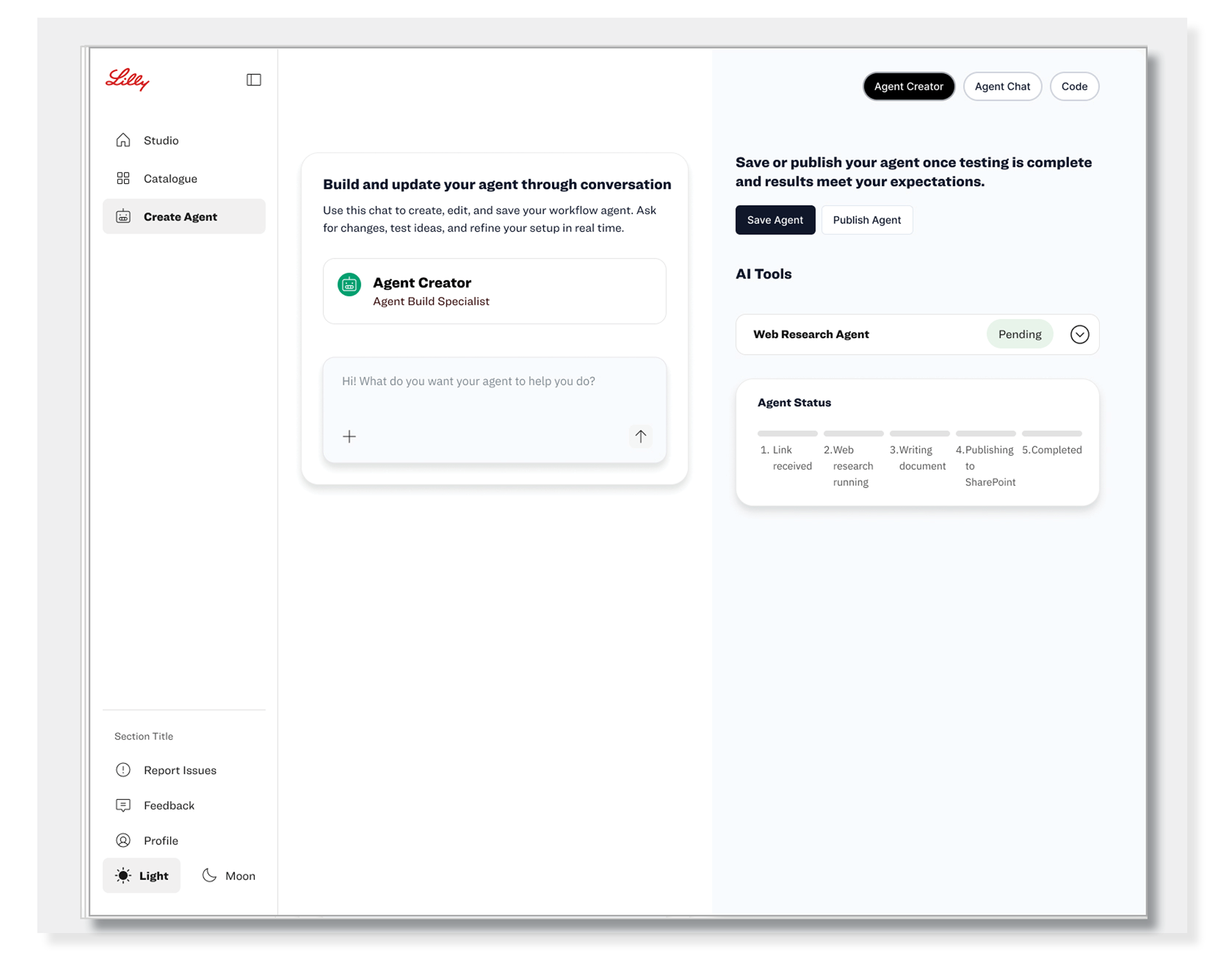
Step 6: Review, Approve & Save the Agent
• Users review the generated agent to confirm the experience, content, and functionality meet their needs.
• Users can make final adjustments before approval.
• Once approved, the agent can be saved and prepared for future use or publishing.
Step 7: Test & Validate the Agent
• Users interact directly with the newly created agent to test its responses and functionality.
• Testing helps ensure the agent produces accurate, relevant, and useful outputs.
• Users can identify areas for improvement and refine the agent before final use.